Saturday, June 23 2018
I finally had time and a use case to build this idea that I had some years ago.
The idea is pretty simple.
I wanted to have a USB flash drive that is network connected to allow adding files remotely while the drive is
connected to a device such as a SmartTV. Basically this would allow any device that is capable of
reading files from USB flash drive to have access to data stored on the network.
For the first version of this project I used a Raspberry Pi Zero W. The PiZW comes with a USB OTG port, Wifi, and runs of a mini SDcard. So we have USB client (to emulate a USB mass storage device), Wifi (for network connectivity), and the SDcard for the actual storage.
The current implementation basically is a small linux system that takes up a tiny part of the SD card, the rest of the SD card is used to emulate the USB flash drive. The linux system automatically connects to my WiFi network. You can transfer files to the SD card via SCP. The trick of the system is that you can soft plug and un-plug the USB drive via SSH. This means you simply run a command to enable or disable the mass storage emulation, this will look like an plug or un-plug event to the device the PiZW is connected to.
I used Buildroot for this project, I created a repository that allows you to build this entire device for yourself.
My Buildroot repository contains all the scripts and settings to enable USB OTG and device switching.
The repository can be found here: github.com/crmulliner/usbnetstore.
After finishing this project I found the SanDisk Wireless Stick basically a USB flash drive with built-in Wifi. Sadly it turns out you can't switch between WiFi and USB using their app (it comes with a mobile app). This means as long as it detects a USB connection it will not allow Wifi Access. Therefore, the SanDisk device is not sufficient for my use case.
My SanDisk Wireless Stick also stopped charging after a week or so (and thus became a brick). I disassembled it and
found that the storage is provided by a SD card. The device is actually made by AirStash and sadly does NOT run Linux and therefore is not easily modifiable.
Below some pictures of this project:
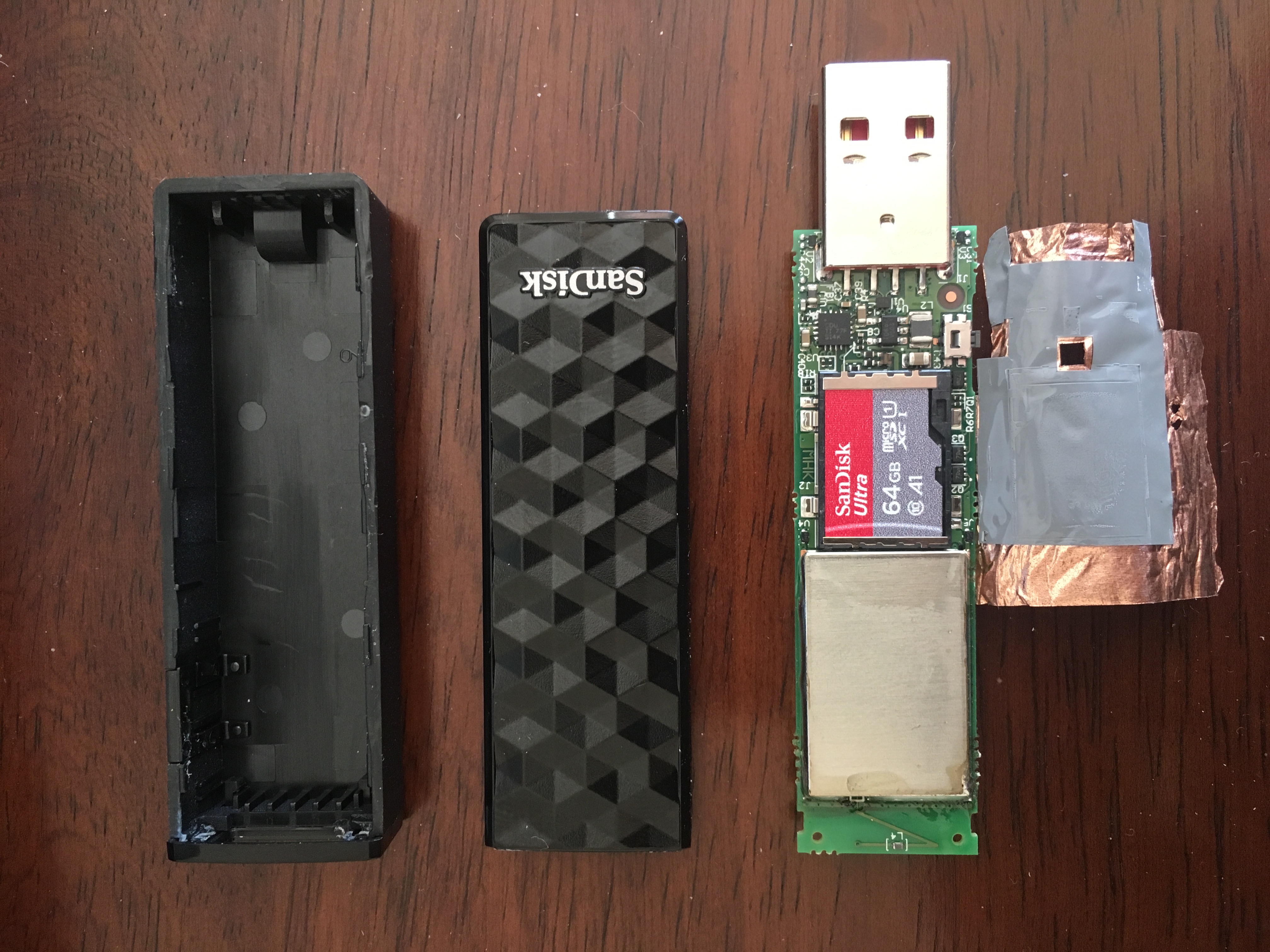
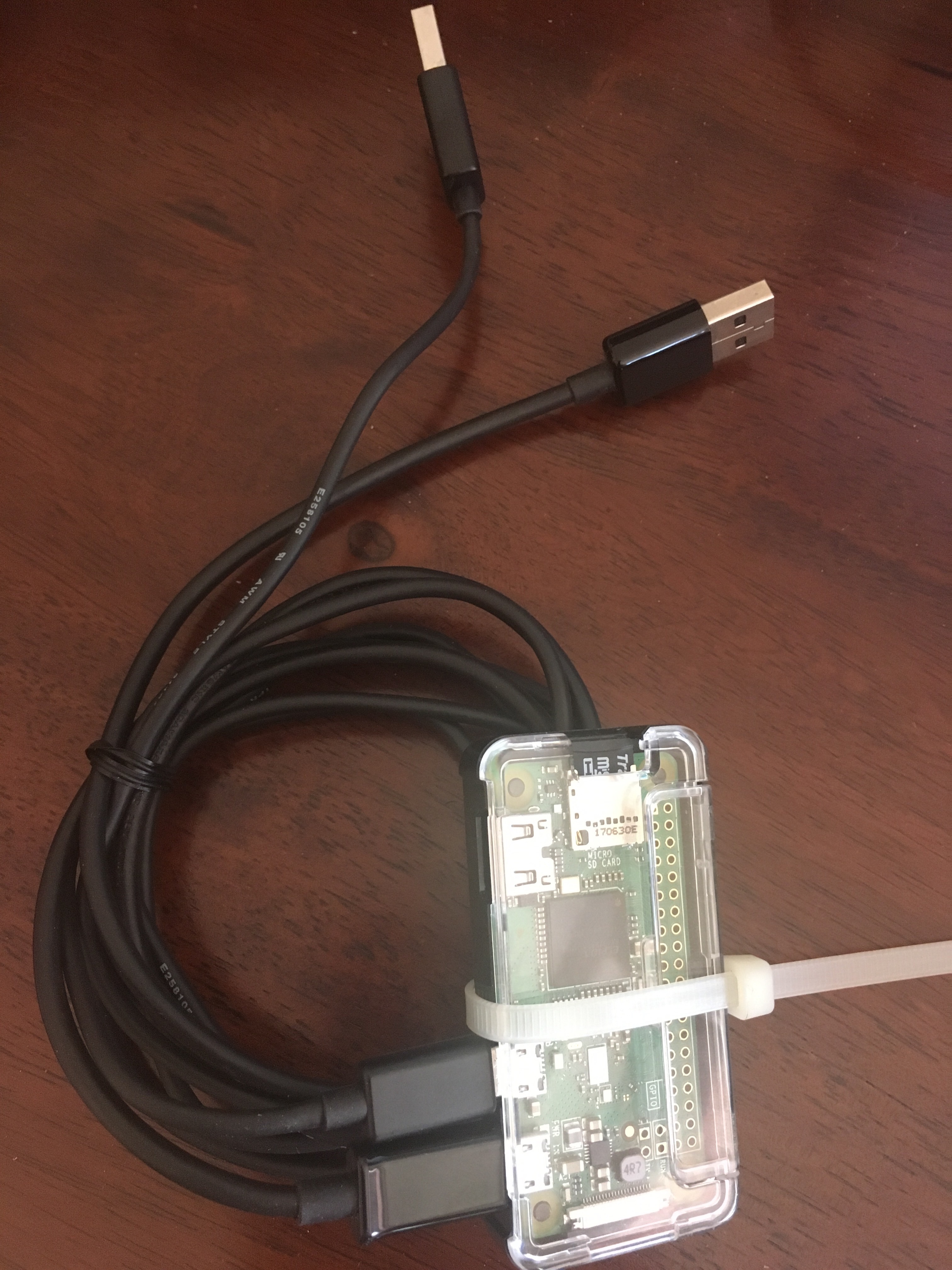
One USB connector for power and one USB connector for the flash drive.
I'm now working on the second version of this project.
Thursday, May 28 2015
I bought an Amazon Dash button just when it was released. A few weekends ago I had time to play with it and here is my write up. This is not really a security write up, I was just interested in how it works. There is a decent hardware focused overview available here: Inside the Amazon 802.11b/g/n Dash Button. This overview is more on the software side!
Summary:
The Dash button connects to Wifi and sends a HTTP POST every time you press the Dash's button.
The Dash is completely shutdown until you press the button, it will switch off seconds after the HTTP request is done with a small timeout to wait for the server's reply. The HTTP connection is protected via SSL but the Dash button doesn't check the certificate and can be easily intercepted. The main part of the data exchange seems to be the Dash Serial Number (DSN).
Background
The Dash button is a simple way to reorder a specific item from Amazon.
The item that is ordered needs to be preselected at setup time, so far each button
only allows you to select from a very small list of related items.
My Cottonelle button only allows to pick one out of four Cottonelle products.
So unfortunately you cannot just order ANY Amazon item :-(
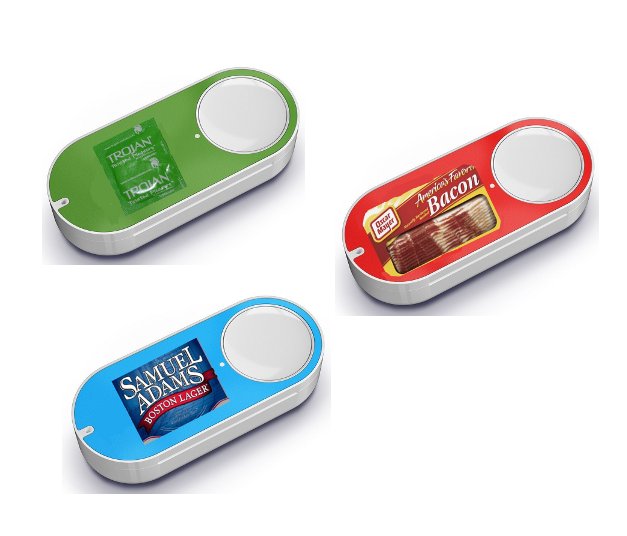
Below: my mock-up for what people actually want to use the Dash button for (beer, bacon and condoms).
Setup
The setup process is pretty straight forward. You install the Amazon app on your phone and go to My Account and select the Dash Button menu.
The app takes you through the steps and your Dash is configured.
Some interesting parts of the setup are.
Wifi setup
The Wifi is configured from the app using an audio channel. In the setup mode of the Dash
it receives the audio and demodulates it to set the Wifi network name and the password.
In addition to the audio based configuration the Dash also creates a Wifi access point named Amazon ConfigureMe. Once you connect to it you can go to http://192.168.0.1 and configure the Wifi settings via the web interface. Once you click Configure the Dash reboots. I actually didn't manage to connect the Dash after configuring it through the Wifi interface (I also didn't try that hard).
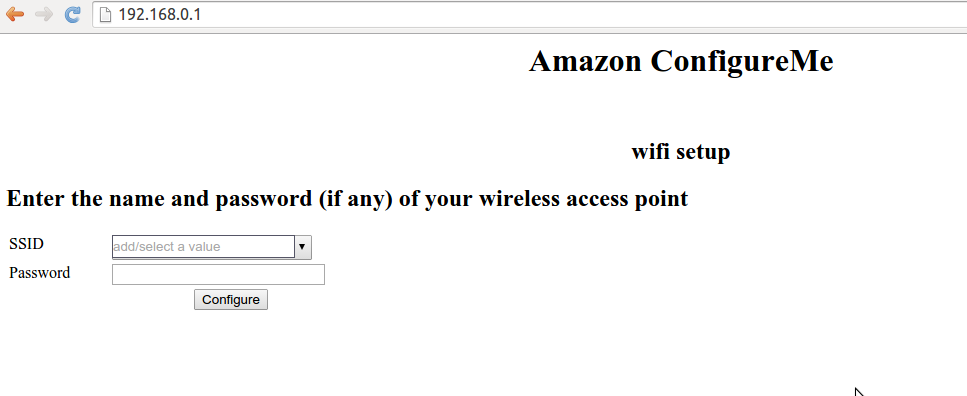
As the last part of the setup you select that product you want to reorder every time you press the Dash button.
Investigation
While playing with the Dash I discovered a number of small things.
Open Ports
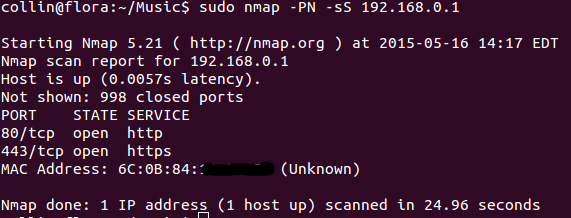
The Dash opens ports 80 and 443. I was NOT able to connect to 443. Port 80 obviously provides the web interface to configure the Wifi settings (previous paragraph).
DHCP
The Dash shows up as WICED*DHCP*Client on your Wifi router host list.
Networking
All communication goes to parker-gateway-na.amazon.com on port 443.
The Dash button does NOT check the certificates so you can easily MITM it and look at the network traffic.
I used my Wifi router's DNS service to resolve parker-gateway-na.amazon.com to a local IP address running webmitm (from the dsniff package). Using the generated key/cert you can easily look at all the network traffic using ssldump or wireshark.
How to generate network traffic without ordering anything!
The one problem with the Dash is that it is only online (connected to the Wifi) for a short time when you press the button. Pressing the button will initiate an order, so playing with your Dash could end up in a lot of toilet paper showing up at your doorstep.
One easy way to avoid this is by skipping the last step of the configuration. If you skip that last step your Dash button thinks it is configured but the backend doesn't. The last step of the configuration is selecting the product you want to order. Basically you need to quit/kill the Amazon app when it asks you to select a product for your Dash button. Once you do this you can press the Dash button as often as you want without triggering an order of toilet paper. The Dash button will come online connect to your Wifi and connect back to the Amazon backend. This gives you the time to collect network traffic or port scan the Dash.
Dash network traffic
I only looked at the traffic between the Dash and the Amazon server. I didn't look at the traffic from the Amazon app to the Amazon server during setup. I should have done this but I didn't. Now I don't have the time to do it. I barely have the time for this writeup.
From what I can see the Dash sends only a few messages to the server. The first thing you see is that the messages always contain the Dash serial number (DSN) that is printed on the back of the Dash button.
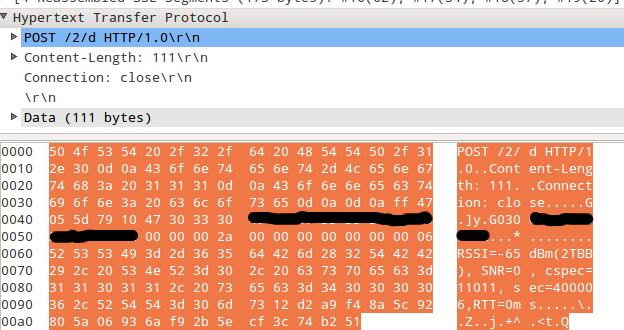
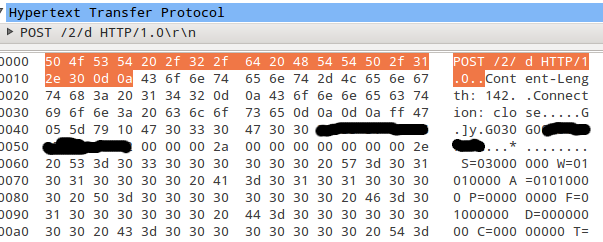
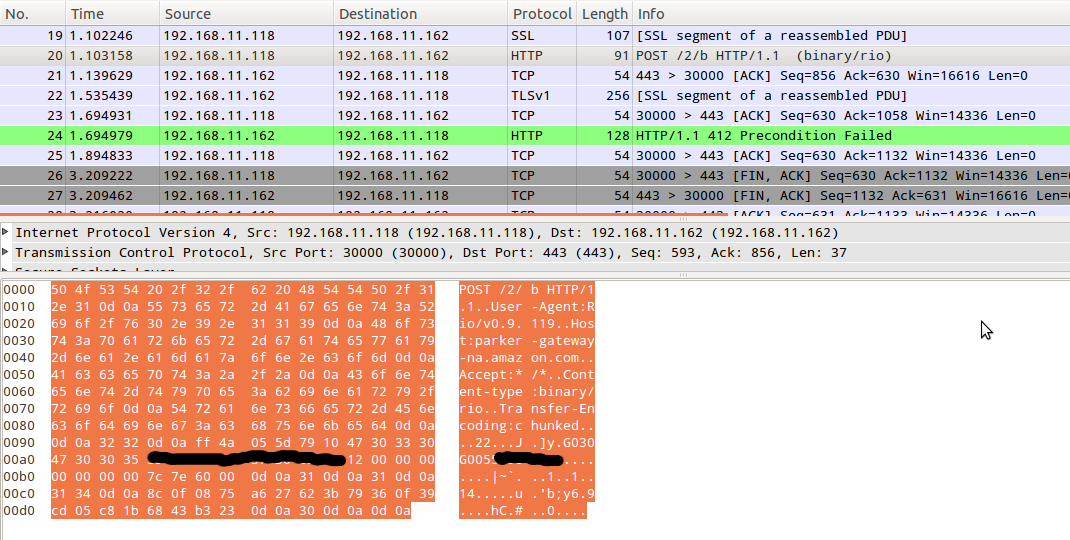
All communication is carried out via HTTP POST. Content-type is set to: binary/rio. The encoding is set to chunked. The encoded data is a mix of ASCII and binary with a length fields for specific parts. I didn't have the time to reverse the message format, I just took a brief look at it. The last part of each message seems to be 20 bytes of binary data.
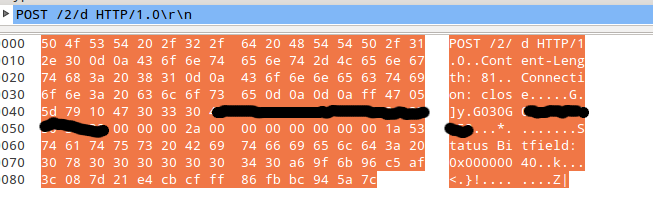
During setup the Dash sends some data such as RSSI values to the Amazon backend. There is a status bit field message and of course there is the message that is sent when the button has been pressed and the Dash thinks it is fully configured. If the Dash thinks it is not setup correctly pressing the button will just lead to a blinking red light.
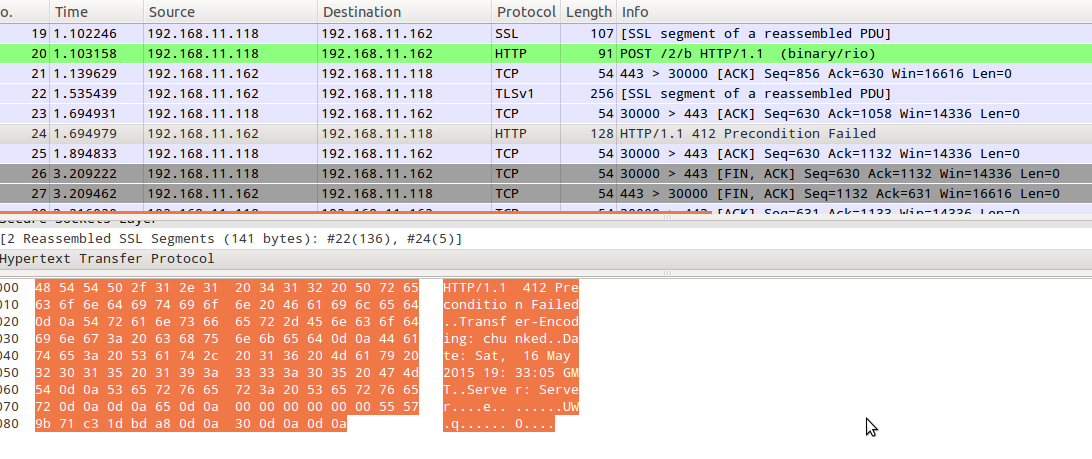
If it thinks it is configured it will connect to the Wifi and send a specific message. The message is rather short and mainly consists of the DSN followed by the 20 bytes of binary data. The server answers to this with different messages. The only message I saw so far was the message for a not fully configured Dash button (HTTP 412 Precondition Failed). So far I was not in the mood to actually order something. I leave this exercise for other people.
Package Captures:
Message sent during setup:
Some status message:
Some message sent from the Dash to the server:
Message sent when the Dash button is pressed and the Dash thinks it is configured:
Server answer when the Dash button does not have a product associated:
Conclusion / stuff to do:
The Dash seems like a fun toy, I wish you could just configure it to order any item from Amazon.
I know the current version is just a trial and I hope in the future they will allow you to select any product.
One thing that I found strange is that there is no back communication from the server to the Dash button at setup time. The only message that is sent from the server to the Dash is after the server receives an order item message after pressing the Dash's button. This must mean that you can either modify the message and change the DSN to initiate an order for another Dash button. OR The last 20 bytes provide integrity protection for the message.
Hacking Todo List:
Sniff traffic of an actual order. Specifically the answer from the server.
Open the device and dump the firmware!
Reverse message format. What are the last 20 bytes in the message? My guess this is for integrity protection. Like an HMAC. But this is just wild speculation.
Sniff communication between Amazon App and server during Dash setup.
Happy further hacking!
Tuesday, July 05 2011
I recently bought a Galaxy Tab 10.1. I mainly got it for reading and annotating PDFs and other electronic texts. For the same reason I once bought the first version iPad but quickly (after 1 week) sold it again since it was too much of Apple lock-in.
So far the Tab 10.1 looks pretty cool. It is light, has a nice screen, and the speakers are decent. It looks like one can more or less install any Android application from the Market. There are some exceptions such as Skype, Skype doesn't want to be installed on the Tab.
Browsing the web on the Tab 10.1 is quite fun. Like with the other Android
devices Flash also works on the Tab.
All in all I think it was worth buying it, but lets see how long it takes until
it will become a paperweight.
Monday, May 10 2010
I'm kind of clearing out my basement, to get rid of stuff I don't use any more or haven't used in a couple of years. So I found this big bag with a lot of Palm OS devices. A Palm Pilot Professional (with Palm III upgrade board), a TRGpro, HandEra 330, Sony Clie 300, and a Palm Tungsten T3. And of course a whole bunch of Cradles (docking stations), cables, and styli.
So I'm actually looking into selling or giving away the complete collection as one big package. I really loved that stuff and my Palm Pilot was the device that
more or less got me started writing software in C. So if you are or know any collectors please let me know, or write me if YOU are a collector or otherwise interested in the stuff.
Friday, April 09 2010
 I got an iPad yesterday and played with it all day and night. Here my mini
review.
I got an iPad yesterday and played with it all day and night. Here my mini
review.
First, because I live in Germany I can not use my normal AppStore
account right now since the iPad is not officially soled here in Germany
and therefore access is blocked for me. Easy solution is to create a
US AppleID and use the US AppStore. No big problem just a pain in the ass.
The first thing I tried even before creating a US AppleID was the web browser
and the PDF viewer's quality. As reported by other people both are quite good. Web browsing is way more fun then on the laptop. This is just browsing not working or researching something on the net. Safari on the iPad is HTML-5 capable which is really cool. Also more media-heavy sites need to support HTML-5.
Google maps is also really fun on the iPad. Just putting the iPad on a table and pan around is really impressive (I know - no magic here - just a fast CPU).
The iPad AppStore is still pretty weak. A few good apps exist but most of them actually cost money. The comic book stuff looks real good. Also I'm not a big
Marvel fan. The ABC app looks super awesome but since I live in Germany I can't
use it to watch TV shows (I guess I have to get a tunnel to the US to try it).
Finally a small list of stuff I want for the iPad:
- jailbreak - to install what ever I want
- Stand alone PDF viewer - where I can add notes (I would pay for this)
- The browser should NOT advertise itself as a mobile browser. Many sites disable some functionality because of this
Thursday, December 24 2009
This is for educational purposes only! I just did this to get it working not for
abusing the Kindle's Internet capabilities.
First enable USB networking, if you have firmware 2.3 than see my
older post here. Now you can login to your Kindle 2 via SSH.
Copy tcpdump to your Kindle 2. Login to the Kindle and run tcpdump -nAi ppp0 -s0
than browse the web using your Kindle's web browser. Search the output of tcpdump for the x-fsn header. The x-fsn header seems to be used for authenticating to the Kindle HTTP proxy (fints-g7g.amazon.com).
HTTP header as sent to the proxy by the Kindle's browser (NetFront):
GET http://www.heise.de HTTP/1.1
Accept: image/png, image/gif, image/x-xbitmap, image/jpeg, image/pjpeg, */*
Host: www.heise.de
User-Agent: Mozilla/4.0 (compatible; Linux 2.6.22) NetFront/3.4 Kindle/2.3 (screen 600x800; rotate)
Proxy-Connection: Keep-Alive
Accept-Encoding: deflate, gzip
x-fsn: "XXXXXXXXXXXXXXXXXXXXXXXXXXXXXXXXXXXXXXXXXXXXXXXX"
x-appNamespace: WEB_BROWSER
x-appId: Kindle_2.2
Install the Modify Headers Firefox plugin. The plugin allows to add arbitrary HTTP headers to
Firefox. Now add the x-fsn header with the value observed through looking at your own traffic.
Finally login and port forward a local port on your computer to Amazon's Kindle proxy (fints-g7g.amazon.com = 8099:72.21.210.242). Do this via:
ssh -L 8099:72.21.210.242:80 root@192.168.2.2. Now configure a HTTP proxy in your Firefox preferences (127.0.0.1 at 8099).
Now you should be able to browse the web using your Kindle's 3G connecting. Of course you shouldn't do this regularly, just once for the fun.
Tuesday, December 22 2009
Today I've done some hacking on my Kindle 2. I have done this and that nothing really cool yet. The first thing I needed to do was to re-enable USB networking since this is disabled in 2.3. The link below enables SSH and telnet on the 2.3 firmware. The second link
is a presentation from OSCON, the interesting things are the infos about the framebuffer and the keyboard. Have fun!
Re-enable usbNetwork on Kindle 2 firmware 2.3 usbnetwork23-0.10.tar.gz
Hacking your Kindle a talk from OSCON.
Saturday, January 24 2009
I've recently build myself a new NAS box
based on PC hardware (VIA C7-D) with a 220W power supply. Now I wanted to
see how much power this thing actually consumes. For the measurement I bought
a Voltcraft Plus ENERGY MONITOR 3000.
The measurements for now are:
~332kWh/year while the thing is idle
~376kWh/year during normal operation (ethernet + disks)
If you take 20cent/1kWh you pay about 75Euro a year for powering this thing.
Monday, January 19 2009
in the early evening I got back my Samsung LCD TV, actually a brand
new one since the one I originally bought had broken HDMI inputs. This
was the reason why non of our MacBooks and PCs were recognized by the TV,
see here. The TV I got today just works, instant picture when connecting
my MacBook using a DVI-to-HDMI adapter selecting multiple resolutions.
Now I can safely say this was a really good buy.
Wednesday, January 14 2009
Yesterday the parts for my new NAS/backup box arrived. As you can see I've
stopped looking for an off-the-shelf (embedded) NAS box and decided to build
one based on standard PC components.
This is mainly because of cypto
acceleration which is not easy to find in embedded NAS boxes. Also many
embedded NAS boxes such as the NAS-4220B from RaidSonic (based on gemini design
by storelink) or the devices based on the Orion
design have crypto acceleration hardware but lack driver support. The
gemini crypto driver is designed for ipsec but works with loop AES but no dm_crypt support.
The orion kernels don't have crypto support at all.
Back to my new NAS box. I choose a VIA C7-based board since it supports PadLock. PadLock is supported on Linux and FreeBSD (and possible other OSes).
Hardware list:
The total price of 161 Euro is really good for a small home NAS without disks. In this configuration
it can hold two SATA disks (and two PATA disks). If you want four SATA disks you will need to buy
a PCIe SATA controller (costs between 20-30 Euros). The only drawback is that the device only has 100Mbit Ethernet. Mini-itx boards with Gbit Ethernet cost about double the price (about 120 Euros).
Software wise I will just install a minimal Ubuntu server to a USB flash disk that will server as the
system disk. This is so it can spin down the storage disks while this thing is in idle.
About power consumption, the case has a 220W power supply that will, of course, eat more energy
then an embedded box but this is the price you have to pay I guess. Also I guess you can find
mini-itx cases that have smaller power supplies (tips are welcome).
Sunday, January 04 2009
finally I've managed to find the time to disassemble my CradlePoint PHS300 to take pictures of the
hardware. The pictures can be found here: www.mulliner.org/hardware/cradlepoint_phs300
The hardware seems to be build based on the ubicom IP3023. From what I can see after a quick check of the SoC spec. this thing does not run Linux. This
is sad since I really hoped this would be the case.
I already assembled a list of hardware I'm going to buy this year. Of course
the list is not complete :-) I really like to get hints for all hardware
on my list, thanks!
1) NAS Box (or multiple)
I bought a NAS-4220 in March last year. I wanted to run it
as a backup device with raid-1 and crypto. But it turned out that not all
of the required software works good enough to be used for backup (a unstable backup system is useless in my opinion). So I'm going to sell it (the actual hardware and default software works just fine).
So I'm looking for a nice NAS box that runs Linux (or can be made to run Linux).
The devices based on the Orion SoC look nice. See here. Unfortunately the crypto acceleration is not yet
supported. Crypto is thing I really need in hardware as raid-1 works just fine
in software on Linux.
2) 802.11n Wifi router that runs OpenWRT
No research done yet besides a brief check on the OpenWRT site. Seems some routers
are supported but with out supporting the 802.11n part itself.
3) Internet Radio device for the kitchen
I want something that just works, runs Linux, and is hackable. Needs WiFi. Good looking hardware that is not too big.
4) Gaming Computer
Since 2004 I only own laptops (besides my media center/home server). From
time to time I think about playing/buying some games but since non of
my laptops can handle current games I will go and buy a gaming computer.
It will need to cost less then 1K Euro (without screen). I'll probably go
for a intel E8400 with 4GB ram and a nVidea GTX+ with 512MB. Is this
OK for most games this year? I mainly like real-time strategy C&C, WarCraft, StarCraft style games.
5) Android-based mobile phone
I ordered a Kogan Agora Pro in December.
I mainly ordered this one because it is really cheap in comparison with the G1.
Looking forward to play with it. It will be interesting to see how the whole
android thing goes this year.
6) Media streaming device (something like Apple TV)
I want a device to put audio/video into my living room without the need for
a computer (my media center is too noisy after all). I have a Zenega/S100 in my bed room which is really great but can't play high bit rate content.
Monday, December 15 2008
Last weekend Judith and I bought a
Samsung LE-40A859
(a big ass LCD TV). We choose this specific device because we got a good deal at a local MediaMarkt store (they actually just matched the average online price).
Originally we were looking at a Samsung 40F86BD but it turns out that this is a really old model, the alternate Philips model was described as computer unfriendly (in various forums). The first impression of the LE40A859 is really good.
Very slim case, lots and lots of inputs and connectors. A really good picture (also I don't really have something to compare it to).
One of the first things I noticed is that there are no round edges when displaying content via the VGA
port. The first bad thing I noticed is that the TV didn't detect my new MacBook and Judith's old MacBook using a DVI-to-HDMI adapter. The MacBooks also didn't detect the display at all. People in various forums either complain about the same problem. On the other side there are many posts about this combination working
fine. So for now I guess that I maybe bought a bad DVI-to-HMDI converter or
cable. Any hints would be welcome.
The LE40A859 also comes with DLNA. DLNA is an extension/service of UPnP and
basically turns the TV into a media player instead of just a display. The
media types and frame rates are of course limited but I got a good part of
my content to play. The DLNA server I use is TwonkyVision which is OK but commercial. Any hints for a decent free DLNA server for Linux?
Btw. the TV also plays video files form a USB-key or USB-disk which I think is kinda cool.
So now my TV has ethernet (optional WiFi via USB) and an IP address. So guess
what I did first? Yes, I did a port scan. I only found one open TCP port at 52396 (probably the UPnP device), it identifies itself as DMRND/0.5. Any ideas what software this is? I also could not determine the OS running on the TV, would be kind of interesting I think. Not that I want to mess with it but I just
want to know since it sits on my LAN (I probably want to firewall it's IP address to prevent it form phoning home).
All in all a good buy, hopefully our MacBooks will talk to it once I change the
DVI-to-HDMI adapter.
PS: I don't think about upgrading my media center computer to HD right now since there is just not enough HD content available yet.
Thursday, October 23 2008
two weeks ago I got the 6 cell battery that I ordered way over a month before. Now my
netbook runs for about 4 hours while using WiFi, this is not great but good enough.
Also with the two batteries I get a total of 6 hours. Note, this is Linux not Windows.
The battery is one of several upgrades I put into this device: the first thing I added/replaced
was the really bad passive cooling, I replaced it with a 20Euros thingy (that works really great
and lowered the temperature by 5-10C).
Second was the WiFi card. I replaced the RealTek crap with a Atheros a/b/g from eBay, again 20Euros.
The battery was 80Euros. All in all I paid 580Euros for this netbook. This is not really
cheap but the thing I really like is the form factor and a decent notebook/laptop that has the
same size and weight costs about 1000-1200Euros, so I'm happy :-)
The only thing that still bugs me is the touchpad. The sentelic thing used by my Wind is no
competition for the synapics touchpad in my 4 year old Thinkpad. Also I kind of got used to
it by now.
Looking at the other netbooks that are currently available the MSI Wind still is one of the
best. At least for my needs.
Monday, September 22 2008
I bought a MSI Wind netbook a while ago and I really like the size and
how small it is. The one thing I really hated was the bad RealTek Wifi card. It
often lost the connection to the access point and almost never worked after
resuming from suspend (to RAM). All this on Ubuntu 8.04.1. Last weekend I
finally got my Mini-PCI-E Atheros Wifi card I bought on eBay for 20 Euros.
The card works great, no lost signal, suspend/resume works great. My MSI Wind
now really rocks. As soon as I get the 6 cell battery it should rock even more :-)
Wednesday, August 06 2008
Ubuntu 8.04.1 works just fine on the MSI Wind just make sure you really have
8.04.1 since 8.04 will not install due to module crash.
Stuff that worked out of the box for me: Audio, Ethernet, WebCam, Bluetooth, SD/MMC card slot.
Wireless LAN was the only thing that didn't work out of the box. After I installed the right
driver for the Realtek Unknown 8199i (rev 22) it worked. The driver is auto loaded and
the network manager can configure it for WPA-PSK and unencrypted (only modes I tested).
The driver is rtl8187se get it from here the current version seems to be from 07.16.2008, this works for me.
The whole wireless lan issue with the MSI Wind is kind of strange. The initial report said that the
Wind will have an Atheros based wireless card. The Media Akoya Mini apparently has a RaLink wireless
card. My MSI Wind has a Realtek card. Anyway it works so I don't care.
Tuesday, August 05 2008
I finally got my MSI Wind (one month after I ordered it). I bought the black version with
a pre installed 2GB upgrade (yep I'm getting older). Right now I'm installing Ubuntu
since there is no way I use WinXP (home).
First overall impression is good.
Thursday, July 17 2008
...now it fully supports the Huawai E220.
Finally CradlePoint updated the firmware for their
mobile access point PHS300 that
bridges your GPRS/UMTS/HSDPA USB device to wireless lan. The PHS300 supported the E220 already
but it was not as nice as it could have been. Now it works like a charm. I can have my E220
plugged into the PHS and just need to flick the switch to have Internet access a couple of
seconds later. Some other features they added are: support for a SIM pin and display of the
GSM signal strength.
After this firmware upgrade the PHS300 is a really good piece of hardware that was totally
worth the money.
Thursday, July 03 2008
I just came back from Aldi (Darmstadt) without a new netbook and I even
got there before 8am. They only had about 10 pieces of hardware and almost
everybody in line before me got a black version. When it was my turn there
was only one sliver version left. So I left. I probably just buy a real
MSI Wind. Just 3-4 weeks of waiting.
This is so funny, I never had the Aldi computer/laptop buying experience before.
I especially enjoyed the upset people behind me in line.
Monday, June 30 2008
Over the last weekend I finally managed to setup my RaidSonic NAS-4220B. Now it runs OpenWRT ported by this guy. I only
added a few kernel options (cryptoloop, md, and raid1) and added the mdadm utility (raid config utility). You probably ask why I use cryptoloop and not dm_crypt. The box has hardware acceleration for AES but this is only implemented
for IPSEC and LOOPAES. So now I run LOOPAES on top of RAID1. The performance is not very good but this is due to my
tests using scp to copy files to and from the NAS. I only get 1.1MB/s. CPU is maxed out on the NAS while the copy process is running. Since the box will be doing automated backups over a DSL line this is fast enough (faster than the
downstream of the DSL line).
Some notes: I have two 500GB disks in the box, when I tryed to create a ext2 file system on the disk I got an out of memory
error from mke2fs. This is due to the fact that the NAS-4220 really runs low on memory (10M free). The easiest fix
was to hook up a USB disk and use that for swap space just until the file system is created :-)
I'm not completely done yet with the setup lets see what other surprises there are for me.
Sunday, April 13 2008
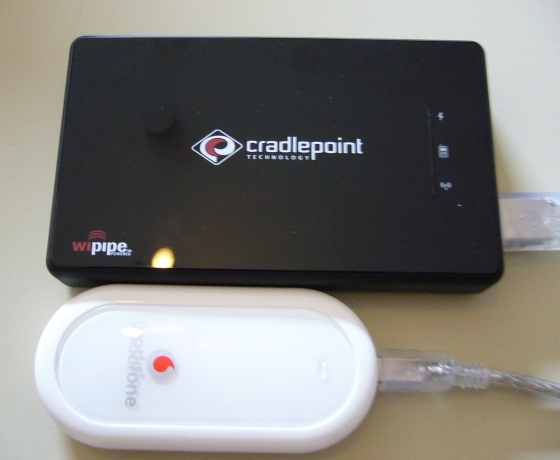 since Friday I own a CradlePoint PHS300 (personal hotspot). The device basically is
an WiFi (802.11 b/g) access point that connects to the Internet using a mobile phone or data
card/adapter (just some hardware that has a USB connector and supports PPP). The nice thing
about this device is that is has a build-in battery. The battery also powers the connected
USB device. I just write this because connecting a USB GSM modem to an access point is not
really new (access point like these have been around for quite some time now). The battery
just makes it portable and that is what I want. My Nokia N810 is the main reason for buying
it, well that and the cheap HSDPA SIM form Fonic.
since Friday I own a CradlePoint PHS300 (personal hotspot). The device basically is
an WiFi (802.11 b/g) access point that connects to the Internet using a mobile phone or data
card/adapter (just some hardware that has a USB connector and supports PPP). The nice thing
about this device is that is has a build-in battery. The battery also powers the connected
USB device. I just write this because connecting a USB GSM modem to an access point is not
really new (access point like these have been around for quite some time now). The battery
just makes it portable and that is what I want. My Nokia N810 is the main reason for buying
it, well that and the cheap HSDPA SIM form Fonic.
Today I've hooked it up and got it to work with my Huawei
E220 HSDPA USB adapter.
Besides some small problems it works really good. The speed also seems good (got around 180K/s down stream). The problem with the E220 and the PHS300 is that the PHS300 doesn't seem to
detect the E220 when they are plugged in before switching on the PHS300. So you have to
power up the PHS300, wait a bit plug-in the E220 and it is working (also sometimes you have
to unplug/re-plug the E220 again to have it detected). I already contacted CradlePoint
support to tell them to fix this and I'm pretty sure they will do it since I'm not the only
person who uses a E220 with a PHS300. See here. Also CradlePoint seems to publish firmware updates quite often so I think there is a good chance.
The PHS300 has an almost complete feature list: custom AT commands, dial-on-demand/autodial/manual dial selection, port forwarding, DynDns, WEP/WAP/WAP2, 802.11b/g/superG, dnscache, ntp list goes on.
Btw. buying this thing in Europe is a pain! I only found one online shop that had a decent price and where I could pay with PayPal since non of them accepted a NON-US credit card. This
NON-US credit card thing is soo stupid anyway. Why do I have a credit card that is supposed to
be accepted anywhere? Anyway the shop is GeminiComputers.
All in all this device looks really nice and I'll post some more about it after some weeks
of using it. It will go into my laptop/gadget bag and I will carry it around with me most
of the day.
Sunday, March 09 2008
earlier today I've done a small benchmark of the 4220's crypto capabilities (the speed at
which you can up/down load when using crypto on the 4220). The results are quite ok for
such a small and cheap system.
Upload (to the NAS) was between 3.5MB/s and 4.5MB/s
Download was about 4.70MB/s
It's nothing when comparing it with the unencrypted speeds (10MB/s up and 19MB/s down).
Thursday, March 06 2008
today my NAS-4220 (RaidSonic ICY BOX IB-NAS4220-B) arrived. The 4220
is a really small NAS box with a lot of nice features like: size of a shoe box, 2xSATA (internal), 2xUSB-2 (external), GBit Ethernet, TCP Offloading, hardware crypto acceleration and it runs Linux and has an open boot-loader (RedBoot). In short this is a totally hack able piece of hardware.
Today I checked out the default firmware to see what it is capable of. The web interface is really bad but who cares. Some cool stuff. It supports RAID0, RAID1, and SPAN (make one disk out of two). You can create crypto volumes through the web interface and it seems to have a build in bittorrent client. Quite nice.
Since this thing has GBit ethernet I wanted to see how fast it is. I just used FTP to upload and download some files from my ThinkPad. For upload I could only get 10.5MB/s downloading was much faster with about 19MB/s. Since this was I quick test only I didn't try to tune anything. Btw. my setup was: the NAS box was running RAID1 (not crypted) and my laptop has a crypted disk. This looks quite good for a 120Euro NAS (without disks).
Now I'm going to build my own Linux image (kernel + buildroot filesystem). I will do this together with Frank who also just got him self a Nas-4220.
[1] NAS-4220
[2] Some infos on the used chip set and Linux support from Harald Welte
[3] NAS-4220 Infos from GPL-Devices.org
[4] NAS-4220.org community
[5] RaidSonic GPL code download (end of page section Sources)
Wednesday, January 02 2008
One cool thing of 24C3 is that people/geeks come from all over the world and bring the latest and greatest gadgets.
So if you are a gadget fan like me you have a good time convincing other people letting you play with their latest toy.
I had the chance to play with a Asus Eee PC (the black version). This thing is
really sooo light you almost can't believe it is a laptop not a PDA. Also I must say the screen is a little small (the size
not the resolution). I didn't had the chance for a long run because there were just too many other people. Nice little thing!
The next device was a Flybook. I know this is not really new, but I never saw one in real before.
The thing I remember best is that the track point seems quite usable even being at a strange position. Nice device all together.
The most expensive mobile device I ever saw. The Vertu Constellation mobile phone.
According to the owner this is a 6000 Euro (!!!) mobile phone. The phone is kind of heavy and kind of feels like it is made
out of pure gold. The owner told me that it is really tough (indestructible) also Vertu will replace it if it breaks somehow.
The money you pay is not only for the device but also for services attached to the device. You have a kind of a personal agent
24/7 that can arrange things like Hotels/Flights for you. It doesn't have any cool technical features - so nothing for me.
I talked to many people with a Nokia N810 Internet Tablet. I wrote a separate story about this here.
I also took a look at the Chumby.
There was a crowed of OLPC owners. They seem to all have a final device, since they had the logo printed on the cover lid (as far as I remember this was not the case with the developer version).
The iPhone. OMG everybody has one now. Steve says: thank you ;-)
Something I really didn't expect, I found bunnie one of the guys behind Chumby at 24C3 - no surprise he was sitting together with the XBox hackers. He had a bunch of Chumbys with him so
I took my chance to take a look.
I found that the Chumby is slightly smaller then I expected (nothing wrong with this). It has a nice look and feel (pictures are ok but nothing
is as good as reality). The Chumby has nice leather-like skin which makes nice and squishy. Playing with it at the congress was kind of
hard, since the Chumby needs a power adapter because it doesn't have a battery and power outlets are kind of hard to get at the congress.
The second obstacle was getting Chumby onto the wireless network which was almost impossible (this years wireless network sucked big time).
Interacting with the Chumby touchscreen worked quite nice (I didn't had much time to play with it). It didn't feel slow or anything.
One particular funny part is the touchscreen calibration which has a nice different addition, a drag'n'drop test at the end.
All in all it was quite fun (much better then the Nabaztag). Also I must say I wouldn't buy a Chumby but this is not because it
is not cool or functional but because I already made my own Chumby-like device (which can also play Chumby content).
[1] Chumby
[2] bunnie's blog
[3] The Nabaztag
Thursday, December 13 2007
 One of my colleges just bought a Nabaztag so I had some time to play with it.
The Nabaztag is a small WiFi Toy in the
shape of a rabbit. It basically consists out of some WiFi chip, a speaker, a microphone,
a bunch of color LEDs and some mechanics to move it's ears. The thing doesn't have a
real purpose it is just a toy. The Nabaztag claims to be able to read out my emails, RSS feeds,
weather information and many other things. The device is configured via a web interface on the
Nabaztag.com website where you first register the device. Here you can select the applications
you want to run on your device. One can select a date/time for each application so you can get the
weather report every hour or so. One of the main features of the Nabaztag is the voice interaction
with the device. Press the button on the bunny's head and speak a command. We found this to not
work very well - it sucked! The guy who bought the Nabaztag then tried to listen to shoutcast (mp3)
streams on his Nabaztag (one of the new features of the second version) - this was disappointing again.
The stream was choppy and didn't sound very good (he actually setup a local shoutcast server in order
to rule out a bad internet connection but still it did not sound good). In the end he actually sent
it back after 2 days of testing - it was just too bad.
One of my colleges just bought a Nabaztag so I had some time to play with it.
The Nabaztag is a small WiFi Toy in the
shape of a rabbit. It basically consists out of some WiFi chip, a speaker, a microphone,
a bunch of color LEDs and some mechanics to move it's ears. The thing doesn't have a
real purpose it is just a toy. The Nabaztag claims to be able to read out my emails, RSS feeds,
weather information and many other things. The device is configured via a web interface on the
Nabaztag.com website where you first register the device. Here you can select the applications
you want to run on your device. One can select a date/time for each application so you can get the
weather report every hour or so. One of the main features of the Nabaztag is the voice interaction
with the device. Press the button on the bunny's head and speak a command. We found this to not
work very well - it sucked! The guy who bought the Nabaztag then tried to listen to shoutcast (mp3)
streams on his Nabaztag (one of the new features of the second version) - this was disappointing again.
The stream was choppy and didn't sound very good (he actually setup a local shoutcast server in order
to rule out a bad internet connection but still it did not sound good). In the end he actually sent
it back after 2 days of testing - it was just too bad.
The Chumby is another device like the Nabaztag but it is more visual since it has a small display
build in. After the bad experience with the Nabaztag I would really like to test the Chumby to
see if it is as bad. Actually I don't think it is as bad - but who knows?!
[1] nabaztag.com
[2] wikipedia.org/wiki/Nabaztag
[3] Chumby
Sunday, August 26 2007
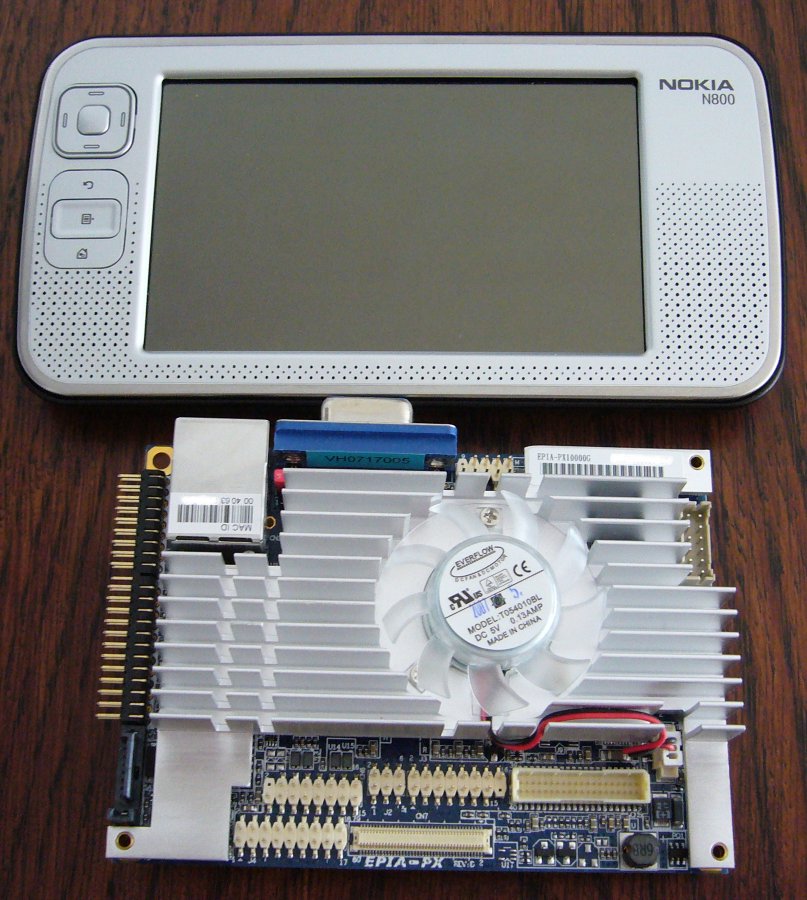
Two weeks ago I bought a PX10000
the first available pico-itx board for one of my projects. The thing is really really small 10cm x 7.2cm
(smaller then the Nokia N800 as you can see on the picture). The board seems too be
100% Linux compatible (I haven't tried the SATA and PATA controllers yet) once you find that you
need the openChrome Experimental Branch to get your X running nicely (VESA driver works but sucks as all ways). The thing really boots from everything you connect to it:
hard disk, cdrom, usb-stick, usb-disk, usb-cdrom (I installed ubuntu 7.04 from a usb-cdrom to a usb-disk).
 I only had a little trouble with the Wake-on-Lan functionality, since there is no setting in the BIOS and it didn't just work. The
trick is to enable wake on PCI card event, after that use ethtool to set the wakeup type and you're done.
I only had a little trouble with the Wake-on-Lan functionality, since there is no setting in the BIOS and it didn't just work. The
trick is to enable wake on PCI card event, after that use ethtool to set the wakeup type and you're done.
The board seems quite fast (I gave it 1GB of memory). The only annoying thing with this board is the fan in the middle of the heat sink. Also the fan is not
to noisy I really would like to see a version that is cooled passively.
The bad part is that PX10000 is quite expensive compared to a Mini-ITX board, the PX10000 comes around 230 Euro while you get a Mini-ITX for around 130 Euro.
If you really need something small for a project I think this is a good choice.
A more complete review can be found at: Mini-itx.com
Friday, June 15 2007
I found Chumby on LinuxDevices early this evening and just couldn't get it out of my head. The Chumby is an alarm clock sized
data display device in a funny looking casing. The Chumby basically is a small ARM-based computer equipped with
a QVGA display and a two USB ports; the software is Linux. From what I understand from the Chumby website the
device is designed to display/run Flash applets
(widgets).
The point of this device really seems to have some kind of pimped alarm clock - which I think is quite cool! It
is kind of strange to find Chumby right now since I was just planning to build something similar. I want to have
something to stick to the wall to just display some text an images. My plan was to use an old Palm and a F*nera
access point but maybe I just wait for the Chumby to become available also I kind of hate Flash.
Anyway I kind of like the idea of Chumby, especially the part of being totally hackable.
Sunday, February 25 2007
I recently bought a T-Online S100 for
about 45 Euros on eBay. The S100 is the name for T-Online's version of the Zenega
VOD (Video One Demand) box. Actually I bought the thing to build a FAT wireless access point but
I discovered that some guy had build a real nice video player distribution for it called zenslack (obviously based on slackware). The distribution is made to be run from
a harddisk/usb-stick/usb-disk attached to the box but since I already had a Debian based system running
it via NFS I wanted to go this way. This way I can just switch the box off with out worrying about
filesystem corruption and such.
By the way the NFS server is my MythBox, so I really only use the Zenega as a viewing client in another room.
Setting up this thing is quite easy once you can get over your self and read the
Zenega User Forum (I hate forums!). Also you need to
get a user account since you need to request a download password for zenslack, which is kind of
stupid since it is all free/open source software.
So far I'm pretty happy with the whole thing. The IR remote works, the S-VHS and SCART connectors both
work. I was able to play all of my test content (mplayer really really rulez).
Saturday, March 11 2006
today I saw the new MacBookPro
my boss (aka. Master Advisor) got and WOW. This thing seems to boot right
quick and he was all about how fast Safari started up. Also
the tiny camera build into the display seems to be really good, not like
these shitty webcams but more like a digital foto camera. The magnetic
power cord also looks interesting ... anyway I'm a Linux nut and I hate
touchpads so I will stick to my ThinkPad with
the awesome trackpoint.
Tuesday, July 19 2005
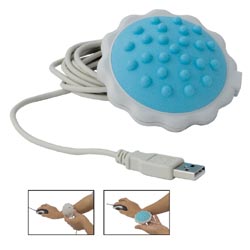 Yesterday I found this thing in a computer hardware store and just had to buy it. If you wonder what this thing is, it is
a massage ball. It's for your neck, shoulder or feet. It is quite nice and 10 Euro is cheep enough for a use once gadget.
Here is the link to it at USBGEEK. I also connected it to the PMA400 but it turns off every few minutes because the PMA goes into standby because
the device only get power from USB and doesn't register with the host controller.
Yesterday I found this thing in a computer hardware store and just had to buy it. If you wonder what this thing is, it is
a massage ball. It's for your neck, shoulder or feet. It is quite nice and 10 Euro is cheep enough for a use once gadget.
Here is the link to it at USBGEEK. I also connected it to the PMA400 but it turns off every few minutes because the PMA goes into standby because
the device only get power from USB and doesn't register with the host controller.
Anyway, lets see how fast it breaks...